surveillance
networking
IP cameras
WatchTower
A professional Windows desktop application built with PyQt5 for viewing and recording live feeds from network cameras. Supports RTSP, HTTP, and MJPEG streams with real-time recording capabilities.
September 2025
published
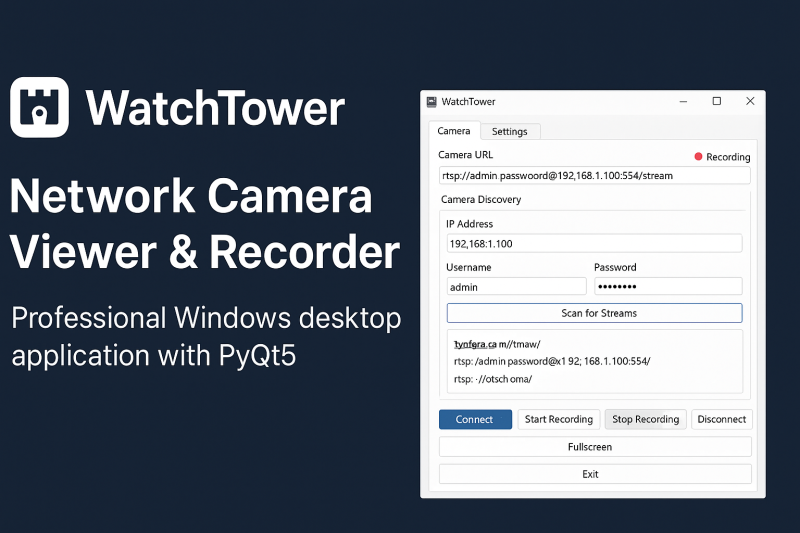
About This Project
WatchTower is a powerful Windows desktop application designed for professionals and enthusiasts who need a reliable way to view and record live network camera feeds. Built with PyQt5, WatchTower delivers a clean, modern interface and a seamless user experience — no Python installation required.
Key Features:
- Universal Camera Support – Connect to RTSP, HTTP, and MJPEG streams, including optimized support for Axis and Canon cameras.
- Automatic Camera Discovery – Scan your network and instantly detect available video streams.
- One-Click Recording – Capture video in real time with timestamped filenames, stored in AVI or MP4 format.
- Custom Overlays – Add camera names and date/time stamps with adjustable positioning, size, and color.
- Fullscreen Mode & Recording Indicator – View streams in fullscreen and easily see when recording is active.
- Configurable & Portable – Save your settings, manage recording locations, and run WatchTower as a standalone .exe file.
- Responsive & Reliable – Thread-safe operation ensures smooth video playback and a responsive UI.
Whether you're monitoring a home security system, running a professional surveillance setup, or just experimenting with IP cameras, WatchTower makes connecting, viewing, and recording effortless.
Key Features:
- Universal Camera Support – Connect to RTSP, HTTP, and MJPEG streams, including optimized support for Axis and Canon cameras.
- Automatic Camera Discovery – Scan your network and instantly detect available video streams.
- One-Click Recording – Capture video in real time with timestamped filenames, stored in AVI or MP4 format.
- Custom Overlays – Add camera names and date/time stamps with adjustable positioning, size, and color.
- Fullscreen Mode & Recording Indicator – View streams in fullscreen and easily see when recording is active.
- Configurable & Portable – Save your settings, manage recording locations, and run WatchTower as a standalone .exe file.
- Responsive & Reliable – Thread-safe operation ensures smooth video playback and a responsive UI.
Whether you're monitoring a home security system, running a professional surveillance setup, or just experimenting with IP cameras, WatchTower makes connecting, viewing, and recording effortless.
Project Gallery


Key Features
Live Camera Viewing: Connect to network cameras via RTSP, HTTP, or MJPEG streams
Camera Discovery: Automatically scan IP addresses to detect available video streams
Axis & Canon Support: Optimized stream detection for Axis and Canon network cameras
Real-time Recording: Record video streams to AVI/MP4 files with timestamped filenames
Text Overlays: Add camera name and date/time stamps to video feeds with customizable positioning
Fullscreen Mode: View video feeds in fullscreen with ESC key to exit
Recording Indicator: Visual red blinking dot shows when recording is active
Configuration Management: Save and load camera settings and overlay preferences
Modern GUI: Clean, responsive interface built with PyQt5 with tabbed settings
Thread-safe Operation: Non-blocking video capture and discovery keeps the UI responsive
Error Handling: Comprehensive error messages and connection status feedback
File Management: Choose custom recording locations and filenames
Standalone Executable: No Python installation required - runs as a single .exe file
Challenges & Solutions
Challenges
- Not all network cameras use standard RTSP, HTTP, or MJPEG streams.
- Users may experience dropped streams, lag, or failed connections due to weak Wi-Fi signals, firewall restrictions, or bandwidth limitations.
- Real-time video processing and recording can be CPU-intensive, causing lag or dropped frames on older hardware.
Solutions
- Offer a manual configuration mode with advanced URL and codec options.
- Implement automatic reconnection logic.
- Optimize frame capture and encoding using hardware acceleration where possible.
Project Information
Client
Public
Duration
3 Days
Team Size
1 developer
Status
Published
Technologies Used
Python


